



Table of Contents
Bringing Your Own Device to work, or BYOD can improve flexibility when employees use personal phones, tablets, or laptops for work access. With 90% of companies allowing access to corporate apps from BYOD devices, BYOD risks are now a practical control issue. The issue is that email and Microsoft 365 files, meetings, chat, and cloud apps can move company data onto devices the organization does not fully configure or monitor.
That creates BYOD security risks such as exposed customer files, delayed offboarding, and added support workload.
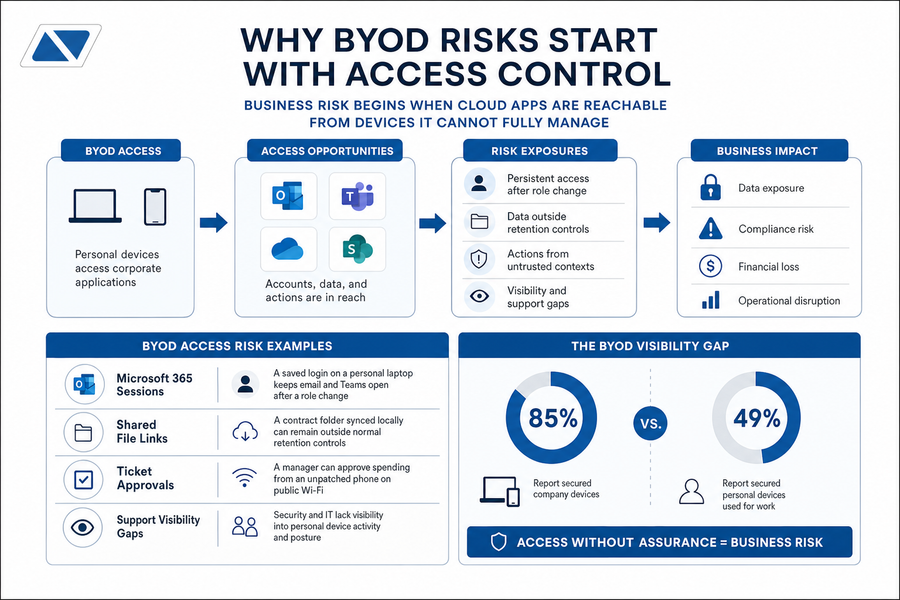
That gap matters because 85% of employees say employers secure company devices, while only 49% say the same for personal devices used for work.
George Hammerschmidt, Executive VP and COO at Nortec, notes: “Treat every personal device as a business access point, then decide what data it can reach, how it is secured, and how access ends.”
Why BYOD Risks Start With Access Control
Business risk begins when cloud apps are reachable from devices IT cannot fully manage. Because 90% of companies allow access to corporate apps from BYOD devices, access rules need clear conditions. A personal phone can become the route into email and Teams, approvals, ticketing systems, and shared Microsoft 365 files if control is inconsistent.
Key examples of this include:
-
Microsoft 365 sessions: A saved login on a personal laptop keeps email and Teams open after a role change.
-
Shared file links: A contract folder synced locally can remain outside normal retention controls.
-
Ticket approvals: A manager approves spending from an unpatched phone on public Wi-Fi.
-
Support visibility gaps: Only 49% of employees say personal work devices are secured, compared with 85% for company devices.
Common BYOD Security Risks In Daily Work
Routine habits create exposure when a lost phone has email open or a weak password protects cloud files. Exposure also rises when outdated software misses security updates or insecure Wi-Fi is used before an invoice review. Verizon reports the human element was part of 68% of breaches, excluding malicious privilege misuse. Research found gaming-related files drive 41.47% of malware infections, often on devices that also access work accounts.
Real-World Example
An employee downloads a customer contract to a personal laptop before a deadline. The file syncs to personal cloud storage outside company retention rules. The employee leaves before IT removes that copy. The result can be a records and client confidentiality issue that slows legal review and customer follow-up.
The Risks of BYOD for Data And Privacy
The risks of BYOD create two duties at once: protecting company data and respecting employee privacy. IBM reports 35% of breaches involved shadow data, with those breaches averaging USD 5.27 million. Almost 63% of respondents warned of financial or regulatory penalties if sensitive information and communications were unsecured. Clear privacy expectations improve adoption because employees know what IT can see before enrollment begins.
Examples of this idea are:
-
App-level controls: Policy can manage business email and files without inspecting personal photos or messages.
-
Selective wipe rules: Work data can be removed from a phone after termination without erasing personal content.
-
Consent language: Policy should explain monitoring, support access, and limits before a device is approved.
More articles you might enjoy:
Operational Problems With BYOD During Support And Offboarding
BYOD creates hidden work after the first convenience. Verizon found 53 percent of firms hit a mobile incident causing data loss or downtime, and problems with BYOD often surface in tickets and access reviews.
Key examples of this include:
-
Help desk scope expands: A Teams login issue can involve phone settings, carrier service, personal storage, and app versions before the employee can rejoin meetings.
-
Patching becomes inconsistent: Older devices may block app updates needed for secure access, increasing troubleshooting time.
-
Ticket ownership gets unclear: Employees may expect support for personal apps that affect work email, while IT still needs boundaries.
-
Offboarding misses devices: A personal tablet can retain OneDrive files after license removal if tokens, app data, and local sync are not addressed.
-
Incident response slows down: IT needs device details before isolating a suspicious login, delaying containment.
Secure Every BYOD Access Point
Personal devices can expose email, files, and cloud apps. Nortec helps you strengthen BYOD controls without adding support chaos.
Managing Bring Your Own Device To Work Security Issues
Managing bring your own device to work security issues requires written rules and technical enforcement. Change needs care because employees value convenience and privacy. Verizon reports the human element was part of 68% of breaches, excluding malicious privilege misuse. Microsoft states multifactor authentication can block over 99.2% of account compromise attacks. Controls should be configured, audited, and adjusted over time.
Examples of how to manage security risks when personal devices are used:
-
MFA and conditional access: Require stronger sign-in for Microsoft 365 from unmanaged devices, unfamiliar locations, or risky sessions.
-
MDM and MAM: Manage eligible devices or approved business apps based on role, data type, and support requirements.
-
Encryption and remote wipe: Protect work data on lost phones and remove business content when access ends.
-
App restrictions: Block employees from copying files into personal apps or syncing records to unmanaged storage.
-
Training and response: Teach employees how to report suspicious prompts, lost devices, and unexpected approval requests.
A Practical Framework For BYOD Risks And Issues
The goal is not to allow or ban BYOD by default. The goal is to match access, device control, and data sensitivity to the role. DataReportal reports 5.61 billion mobile phone users at the start of 2024, so BYOD risks and issues need practical rules that reflect daily work. Since Verizon reports the human element was part of 68% of breaches, policy decisions should account for behavior as well as device settings.
The next step is to turn policy into repeatable decisions.
Role access, app scope, device eligibility, and offboarding workflow.
Examples of this idea are:
-
Role access: Sales may need CRM access only, while finance may need tighter controls for payroll reports.
-
Data sensitivity: Highly sensitive files may require company-owned laptops instead of personal devices.
-
Device eligibility: Unsupported phones should not enroll if they cannot receive updates or meet security requirements.
-
Exit process: Tokens and work apps should be removed before final payroll, not after a manager notices missing access records.
Reducing The Security Risks of BYOD with the Right Support
The security risks of BYOD are easier to manage when policy, identity controls, device controls, and user training align with offboarding workflows. Nortec can help review BYOD policies, configure Microsoft 365 security settings, and support Mobile Device Management for iOS and Android. Its team can also audit access, monitor for issues, and assist with incident response and help desk needs.
A free consultation can start with any personal phone that still has company email, files, approvals, and chat history active. Get started today.
