
• Skip to primary navigation
  • Skip to main content
  • Skip to primary sidebar
  • Skip to footer
  • Technical Support: [email protected] +1 (703) 288-7230
  • Sales Support: +1 (888) 488-3738
  • Calculate Savings
Nortec logo

Nortec Communications

IT Services & Solutions

  • Cloud
    • Cloud Consulting Services
    • Managed Data Backup
    • Data Center Services
    • Hybrid Cloud Computing
    • Cloud Pricing Calculator
  • Services
    • Managed IT Services
      • IT Consulting
      • IT Helpdesk
      • IT Outsourcing
      • IT Support
      • IT Network Support
      • Managed Modern Workplace
      • Managed Cloud Portal
      • Managed EDR
    • Cybersecurity Services
      • Cybersecurity Awareness Training
      • Identity Management
      • Managed EDR
      • MDM Solutions
    • Phone Systems
      • Cloud Phones
      • Mitel Support
      • On-premise Mitel
      • VoIP Phone
    • Microsoft Solutions
      • Microsoft 365
      • Microsoft Licensing
      • Microsoft Teams
      • Microsoft Windows 10
      • Tampa
      • Azure Partner
      • Copilot
    • Network Architecture
  • Resources
    • Blog
    • Case Studies
    • News
    • Checklists
    • Videos
    • Cybersecurity Tips
    • E-Books
  • About Nortec
    • Locations
      • Washington
      • New York
      • Philadelphia
      • Pittsburgh
      • Tampa
      • Alexandria
      • Arlington
      • Bethesda
      • Falls Church
      • Frederick
      • Gaithersburg
      • Reston
      • Rockville
      • Silver Spring
      • Virginia
    • Our Methodology
    • Core Values
    • Leadership
    • Nortec Partners
      • Jenne Partnership
  • Contact
  • Book A Consultation
  • Request Pricing

Primary Sidebar

Subscribe to our blog

Recent Posts

  • Unlocking Success: Navigating Washington Industries’ Unique Challenges and Opportunities
  • What Is Cloud Security? Understanding How to Protect Your Data in the Cloud
  • Network Security Types Explained: Protect Your Business Today
  • IT Strategy for Business: What It Is and How to Create One
  • Selecting the Right Managed Services Provider

Search

Understanding the Best Practices for Disk Imaging and Deployment

Disk Imaging and Deployment

Guest Post:
by Matt Obrien, Dell Kace

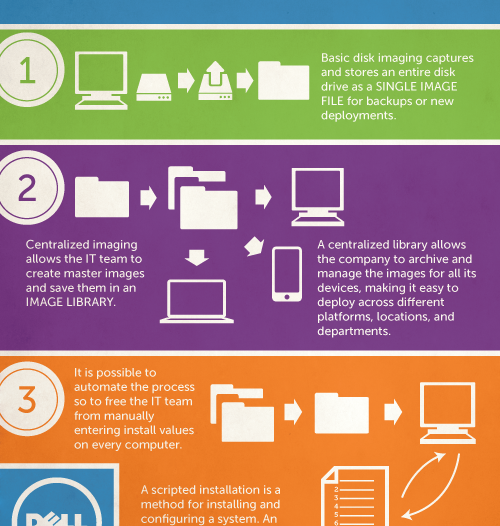
Sitting through one installation after another is not themost cost-effective activity for the IT department, which is why many organizations are turning to other methods to install operating systems, drivers, and applications on new computers or when restoring an older device. These companies adopt a standardized software deployment system that captures the disk image as an image file where it can be edited, organized, and deployed to new or repurposed computers. This is where Disk Imaging and Deployment becomes essential.

Basic Disk Imaging and Deployment

A disk image is a file-by-file copy of a computer’s hard drive, which is saved in one or more image files. These files can be saved to a network, burned to a DVD, or sent to another storage device for further use. This image replicates the entire structure and contents of the hard disk, which can then be used to install operating systems on new computers and set up the necessary applications or to restore damaged systems.

This image lets the IT team set up every computer in a department or organization without having to install the individual components on every system. If the company has a large number of departments and devices, though, the number of images can start to get out of hand. In order to avoid some of the impending issues that can arise for this, many companies employ solutions for effective management.

Centralized Imaging

The images created in this process can be used as a baseline installation for a lot of the normal, everyday, technical needs of the company because they have the basic setup and all the associated patches, applications and programs ready to go. The IT team will still need a way to access all the information when necessary and deploy the right disk imaging to the right device.

By uploading everything to a centralized “image library” the team will be able to archive and manage all their images and easily deploy, edit and maintain them. Different departments may require completely different operating systems and applications, and this allows the IT team to provision everything (even to remote users) from a single, centralized console.

Scripted Installations

Installing and configuring all these systems can be very time consuming, and there are more cost-effective things the IT department could be doing. Scripted installs allow the IT team to install operating systems and applications and even configure the settings without having to sit in front of every computer and manually enter the necessary installation values.

When disk images are deployed from a centralized location, it is possible to use an answer file to respond to all the installation questions and completely automate the process. No one needs to sit in front of a computer for extended periods just to click “Yes” or “No” occasionally. The answer file provides the script for running these installations so the IT department can move on to other tasks while still deploying the necessary installations on each system.

Author Matt Obrien.
Matt works with Dell Kace. He enjoys writing about technology, computers and saving money.

Get a quote for our services sent into your inbox

Nortec

Serving the Atlantic Region from FL to PA

Locations

Washington, D.C.

1629 K St NW #300, Washington, DC 20006, United States
+1 (771) 223-9205

Pittsburgh

102 Broadway St #410, Carnegie, PA 15106, United States
+1 (412) 960-8664

Virginia

7531 Leesburg Pike # 300, Falls Church, VA 22043, United States
+1 (571) 554-2500

Business We’ve Worked With

  • Clients We’ve Migrated to the Cloud
  • Clients We’ve Improved Infrastructure
  • Clients We’ve Protected
  • Clients We’ve Migrated Communications

Follow us:

Popular Posts

  • Unlocking Success: Navigating Washington Industries’ Unique Challenges and Opportunities
  • What Is Cloud Security? Understanding How to Protect Your Data in the Cloud

Need Support?

Tech SupportSales Support

Copyright © 2026 Nortec Communications, Inc. All Rights Reserved.| XML Sitemap | HTML Sitemap | Privacy Policy

[gravityform id=”14″ title=”false” ajax=”true” ]