



Table of Contents
- Cloud Malware Warning Signs Inside Everyday Workflows
- How Attacks In Cloud Computing Disrupt Business Operations
- Malware Cloud Controls That Reduce Daily Exposure
- Reducing Cloud Based Malware Risk During Migration And Licensing Changes
- What To Hand Off To IT Before Migration Starts
- Planning For Malware In The Cloud With Nortec
Cloud email, Microsoft 365 file sharing, Teams collaboration, SharePoint permissions, remote access, and vendor portals now sit inside the same working day. When cloud malware reaches those systems, the first impact is operational: locked files, suspicious mailbox rules, compromised credentials, delayed client work, more help desk tickets, and incident response across users, devices, and vendors.
Over 560,000 new pieces of malware are detected daily, so a malware cloud issue cannot wait in a queue. Our Microsoft-aligned managed cloud support focuses on keeping work moving while security signals are investigated.
George Hammerschmidt, Executive VP and COO at Nortec, notes: “Treat unusual mailbox rules, repeated MFA prompts, and unexpected sharing links as connected evidence, not separate user annoyances, because speed depends on seeing the workflow pattern early.”
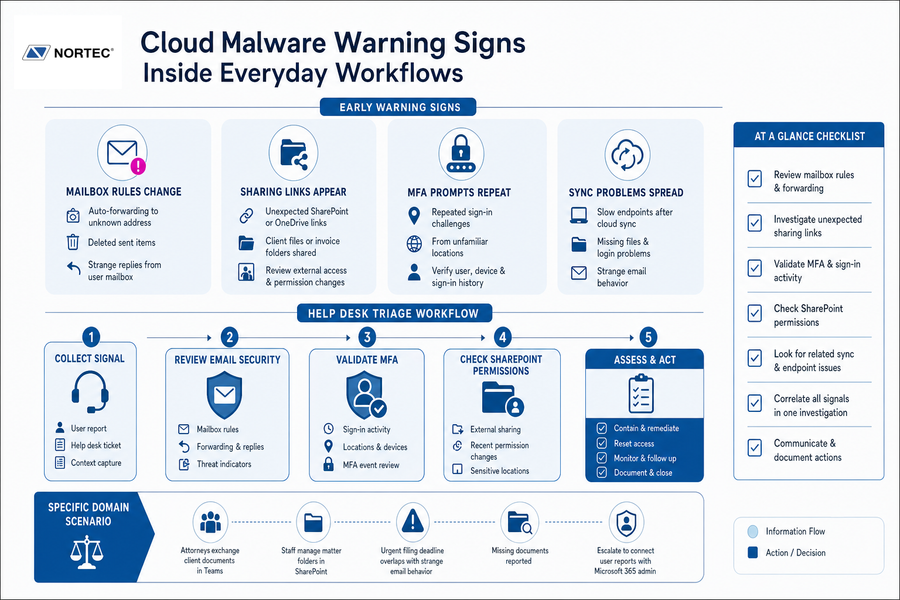
Cloud Malware Warning Signs Inside Everyday Workflows
Early warning signs often appear in routine work before anyone opens a security dashboard. A legal assistant notices a missing SharePoint folder, a manager reports repeated MFA prompts, or accounting receives a reply that does not match the email thread. Those reports look isolated at first, but they belong in the same investigation.
-
Mailbox rules change: Auto-forwarding to an unknown address, deleted sent items, or strange replies from a user’s mailbox point to credential misuse.
-
Sharing links appear: Unexpected SharePoint or OneDrive links, especially for client files or invoice folders, require review of external access and permission changes.
-
MFA prompts repeat: Repeated sign-in challenges from unfamiliar locations should be tied to the user, device, and Microsoft 365 sign-in history.
-
Sync problems spread: Slow endpoints after cloud folder syncing, missing files, login problems, and strange email behavior often arrive as separate help desk tickets. They belong in one investigation.
Specific Domain Scenario: In a document-heavy client matter, Microsoft 365 may support Teams conversations while staff manage sensitive folders in SharePoint. If an urgent deadline overlaps with strange email behavior and missing documents, help desk escalation needs to connect user reports with Microsoft 365 administration quickly.
Those signals matter most when someone can act on them without disrupting the whole office.
Help desk triage should connect email security review, MFA validation, SharePoint permission checks, and user communication in one coordinated response.
How Attacks In Cloud Computing Disrupt Business Operations
Cloud compromise affects the ordinary handoffs that keep work moving: approvals, document access, billing workflows, and client communication. Global telemetry recorded 6.06 billion malware attacks in 2023, and attacks in cloud computing become business problems when trusted systems stop behaving predictably.
-
Email trust breaks quickly
A compromised mailbox can send altered payment instructions or hide replies through forwarding rules. Staff then spend time confirming messages that should have been routine.
-
Collaboration slows across folders
If Teams links or SharePoint libraries become suspicious, users hesitate to open files. Approvals, edits, and client deliverables wait while access is checked.
-
Licensing changes block work
Vendor licensing issues and account lockouts interrupt Microsoft 365 access. A user without the right license cannot reach email, portals, or shared workspaces.
-
Audit evidence becomes harder
Missing logs, unclear permissions, and undocumented access changes create audit gaps. Continuous auditing helps preserve the trail before questions arrive.
-
Response pulls staff away
One malware case infected more than 300,000 systems globally, causing losses above $50 million. Even smaller incidents require ticket review, user interviews, password resets, and coordination across IT, finance, and management.
Malware Cloud Controls That Reduce Daily Exposure
Controls work when they match real habits. If every file share, sign-in, or vendor portal login creates delays, users find workarounds. Guardrails need to protect high-risk activity without slowing normal approvals and client handoffs.
-
MFA with access rules: Require MFA and conditional access for risky sign-ins, unfamiliar locations, and privileged accounts, especially Microsoft 365 administrators.
-
Email filtering standards: Filter suspicious attachments, quarantine risky links, and define who releases blocked messages so users do not guess under deadline pressure.
-
Scheduled permission reviews: Review SharePoint and OneDrive external sharing, inherited folder access, and old guest accounts tied to completed matters or projects.
-
Aligned endpoint protection: Protect desktops and laptops that sync cloud folders, because infected local files can move into shared libraries.
-
Tested recovery plans: Confirm backup and recovery steps for cloud data before a locked folder or deleted library becomes an urgent interruption.
The total number of cloud apps from which malware downloads originate has increased to 167, with Microsoft OneDrive and SharePoint among the top five spots, so these controls need ongoing review.
Changing access controls and user habits takes planning, especially when employees rely on the same tools for client work and daily approvals.
-
Map privileged access: Identify administrators, billing owners, and vendor portal contacts.
-
Review sharing habits: Check external links and escalation paths for suspicious access.
-
Test recovery paths: Restore sample files, document escalation paths, and confirm who approves recovery actions.
Related Cloud Security Reads
Reducing Cloud Based Malware Risk During Migration And Licensing Changes
Moving email, documents, or portals into Microsoft 365 often happens while licenses, devices, and user access change. That transition creates temporary risk when old accounts remain active, MFA is inconsistent, sync settings are unclear, or permissions are copied forward without review. Infostealer attacks increased by 58% in 2024, which makes credential cleanup during migration a practical requirement.
-
Inventory accounts first: List active users, shared mailboxes, service accounts, former employees, and external guests before moving data.
-
Align licenses carefully: Match Microsoft 365 licenses to actual work needs, including email, Teams, SharePoint, security features, and desktop applications, so users are not blocked after cutover or overlicensed before renewal.
-
Design access by workflow: Build Teams and SharePoint access around departments, client matters, project folders, and approval paths, not copied legacy permissions.
-
Monitor after cutover: Watch sign-ins, sync errors, help desk tickets, and user reports after migration so small access issues are corrected quickly.
Stop Cloud Malware Disruptions
Seeing suspicious mailbox rules, MFA prompts, or sharing links? Nortec helps connect the signals and keep daily work moving.
What To Hand Off To IT Before Migration Starts
A clean handoff reduces guesswork and prevents avoidable support delays during migration.
-
Admin credentials and named approval contacts.
-
Vendor contacts, current licensing, and renewal dates.
-
File share owners, retention needs, and archive requirements.
-
Approval workflows for access, billing systems, and client portals.
Planning For Malware In The Cloud With Nortec
Cloud security is an ongoing operating discipline, not a one-time setup. It depends on help desk visibility, Microsoft 365 administration, incident response planning, licensing control, user training, and regular review of how people use email, Teams, SharePoint, and vendor portals.
-
Microsoft 365 reviews: We review users, licenses, mailbox rules, external sharing, MFA status, and administrative roles so access reflects current work.
-
Help desk escalation: Our 24/7/365 help desk support gives users a clear path for reporting suspicious email, login issues, missing files, and device problems.
-
Incident response readiness: We help document who resets credentials, who contacts vendors, who approves recovery, and who communicates with affected users.
If you want a practical review of Microsoft 365, cloud security controls, MFA, email security, licensing, and managed cloud support, contact Nortec. We support small and midsize organizations with personalized managed IT and cybersecurity service, backed by Microsoft-aligned licensing support and certified engineers. We can start with a free consultation focused on the systems, tickets, and workflows that affect daily operations.
