



Your team is already using AI to draft client emails, summarize contracts, clean up invoice notes, and prepare event timelines while sensitive files sit in Microsoft 365. Tools such as Microsoft Copilot are now normal productivity tools, but adopting them blindly creates data liabilities when access controls, policies, and cloud security are weak.
As Daniel Cornell, Business Development at Nortec, puts it: “The moment you turn on an AI tool like Copilot, it has visibility into whatever that user can access. If your file permissions are messy or outdated, AI will inadvertently surface sensitive company data to employees who shouldn’t see it, turning an internal oversight into an immediate security risk.”
Small business AI security makes the daily work safer: clearer permissions, fewer risky workarounds, better client data handling, and less burden on staff.
Small Business AI Security Starts With Daily Workflows
AI risk starts in ordinary work. A paralegal summarizes a contract, an operations lead drafts invoice language, or an event coordinator turns client notes into a timeline from a laptop at home.
-
Client files move faster: AI summaries can speed up legal reviews, proposals, and planning notes, but permissions must follow the user and the file.
-
Approvals need boundaries: Purchase requests and invoice notes need rules about which financial details staff can enter into AI tools.
-
Remote access expands exposure: Staff using multiple devices need managed identity, endpoint protection, and secure cloud configuration.
-
Deadlines increase shortcuts: Busy teams use the easiest tool unless approved options and policies are already clear.
We scope controls around real workflows, user needs, and budgets rather than forcing one rigid model. For organizations with 10 to 700 users, the right AI controls have to fit how files, approvals, devices, and deadlines already move through the business. That includes security policy creation, endpoint protection, access management, and staff training.
Shadow AI Risks That Hide In Plain Sight
Shadow AI means employees use unapproved public AI tools with company information because the approved path is unclear, slow, or missing. It can be as simple as pasting client financials, payroll details, or contract language into a browser tool to get a faster draft.
Specific domain scenario: A legal assistant copies language from a matter file into an unvetted AI tool to summarize arguments for an internal memo. The intent is efficiency, but the firm loses control over sensitive client details. We’ve seen how quickly cybersecurity responses and managed cloud support matter, including after helping Kresses & Piasecki Legal, P.C. move into a managed cloud environment following a security intervention.
-
Data leaves control: The company loses visibility into where sensitive information goes, which is why data loss prevention solutions matter.
-
Policies become unclear: Staff cannot follow rules that have not been written or communicated.
-
Response gets harder: Security teams need logs, device visibility, and known workflows to investigate quickly.
Practical controls include security policy creation, DLP, endpoint protection, anti-phishing, password management, ransomware protection, and incident response.
Microsoft 365 Cloud Security Makes AI Safer To Adopt
Businesses already using Microsoft 365 have a strong AI foundation when the tenant, users, permissions, and security settings are configured properly. Without that discipline, AI becomes another place where overpermissioned data can be found, copied, or misused. Without an expert, most businesses use about 40% of the capabilities available in their Microsoft 365 subscription, leaving useful security and productivity features unused.
-
User access stays current: Onboarding and deprovisioning should assign access based on licensing and remove it when roles change.
-
Permissions match job roles: Staff should reach only the files, mailboxes, Teams, and apps required for their work.
-
Secure Score guides priorities: Monthly Secure Score review provides a security health metric, with our analysis and recommendations.
-
Training follows real usage: Training should focus on the apps and features employees actually use.
As a Microsoft Solutions Partner with Infrastructure and Modern Workplace designations, and with Microsoft-certified engineers and salespeople, we treat Microsoft 365 as the operating foundation for secure ai implementation rather than a set of licenses to renew once a year.
User management, monthly Secure Score review, Microsoft 365 configuration, cloud support.
Related AI And Security Reads
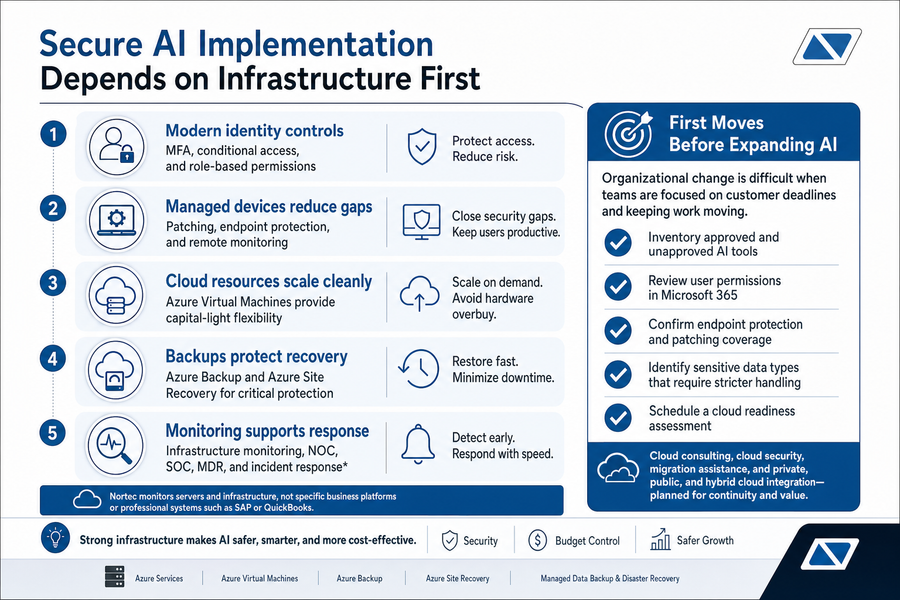
Secure AI Implementation Depends On Infrastructure First
AI adoption is not only a software decision. It depends on identity, devices, servers, backups, network visibility, and cloud architecture. Legacy hardware cannot safely support modern AI workflows at scale when identity, patching, backup, and monitoring are weak, so Microsoft 365 cloud security has to connect with the rest of the environment.
-
Modern identity controls: MFA, conditional access, and role-based permissions help confirm the right user is accessing the right data.
-
Managed devices reduce gaps: Patching, endpoint protection, and remote monitoring keep laptops and desktops from becoming weak points.
-
Cloud resources scale cleanly: Azure Virtual Machines can be a capital-light option when buying physical servers is not the best fit.
-
Backups protect recovery: Managed backup and disaster recovery help restore data after deletion, ransomware, or configuration mistakes.
-
Monitoring supports response: NOC/SOC visibility, MDR, and incident response give your team a clearer path to investigate infrastructure issues. Nortec monitors servers and infrastructure, not specific business platforms such as SAP or QuickBooks.
Adopt AI Securely With Nortec
Turn everyday AI use into safer workflows with stronger Microsoft 365 controls, clearer policies, and practical guidance from Nortec
First Moves Before Expanding AI
Change is hard when people are trying to meet customer deadlines and keep work moving, so start with the controls closest to daily work.
-
Inventory approved and unapproved AI tools.
-
Review user permissions in Microsoft 365.
-
Confirm endpoint protection and patching coverage.
-
Identify sensitive data types that require stricter handling.
-
Schedule a cloud readiness assessment.
Managed IT Services For Small Business Keep AI Governance Moving
AI governance falls apart when no one owns access reviews, policy updates, support tickets, licensing changes, or user training. Security needs regular follow-through, not a one-time setup. For J Street Group, that meant Office 365 licensing, managed desktop and portal services, remote collaboration support, strategic business reviews, and help with everyday technical issues.
-
Support tickets stay visible: Responsive helpdesk support keeps staff from creating workarounds when email, apps, or access break.
-
Policies stay current: Security policy creation should evolve as AI tools and Microsoft features change.
-
Licensing stays aligned: Microsoft licensing consulting helps users get the tools they need without unnecessary spend.
-
Reviews connect IT to growth: Our IT consulting services include vCIO annual reviews, custom roadmaps, vendor management, and security planning.
98% of Nortec helpdesk requests receive a response in under 2 hours, and 99% of tickets are resolved in under 48 hours.
You know your Nortec sales rep and support staff by name, and we work at your pace instead of shoehorning every environment into the same plan. We offer 24/7/365 support for cloud services, while overnight helpdesk support is not offered.
Data Loss Prevention Solutions Need Clear Ownership
Data protection works when someone owns classification, rules, exceptions, approvals, and response. The goal is not to block helpful AI use. It is to keep client files, financial data, legal records, employee information, and customer details inside approved systems, where shadow AI risks can be seen and managed.
-
Define sensitive data: Identify what cannot be pasted into public AI tools, such as matter files, payroll records, and customer lists.
-
Create approved workflows: Tell staff where AI use is allowed and where it is not.
-
Monitor endpoints and access: Connect device protection, DLP, MFA, and user permissions.
-
Train around real tasks: Use phishing simulations and awareness training tied to invoice approvals, email handling, and file sharing.
-
Prepare incident response: Clarify who investigates, who communicates, and what gets documented.
These controls need ongoing management. DLP, endpoint protection, compliance monitoring, incident response.
IT Consulting Services Help Turn AI Plans Into Safe Operations
Safe AI adoption depends on policy, Microsoft 365 configuration, infrastructure, monitoring, and support that fits how people actually work. At Nortec, we help businesses adopt AI at their pace with Microsoft-aligned cloud expertise, flexible scoping, responsive support, and managed IT services for small businesses after the assessment.
As a Microsoft Solutions Partner for Infrastructure and Modern Workplace with a 95.4% Customer Satisfaction rating around tickets and support, we can help you decide what to secure first; contact Nortec for a free consultation or cloud readiness assessment.
